
-
Overview
-
Creating a New Project
-
Editing vs Localization Projects
-
Assigning a Rights Clearance Manager
-
Project Settings
Overview

If you are using the Flawless DeepEditor Avid Extension, create your project with the Extension using the guidance here.
A project in DeepEditor is the container for a group of shots, vubs and media. This could be, for example, for a specific show or for a specific episode of a show within a workspace.
Each project has its own Media Library, shot list, and consent settings.
Every project belongs to a workspace. All users in the workspace can access all projects within it.
Creating a New Project
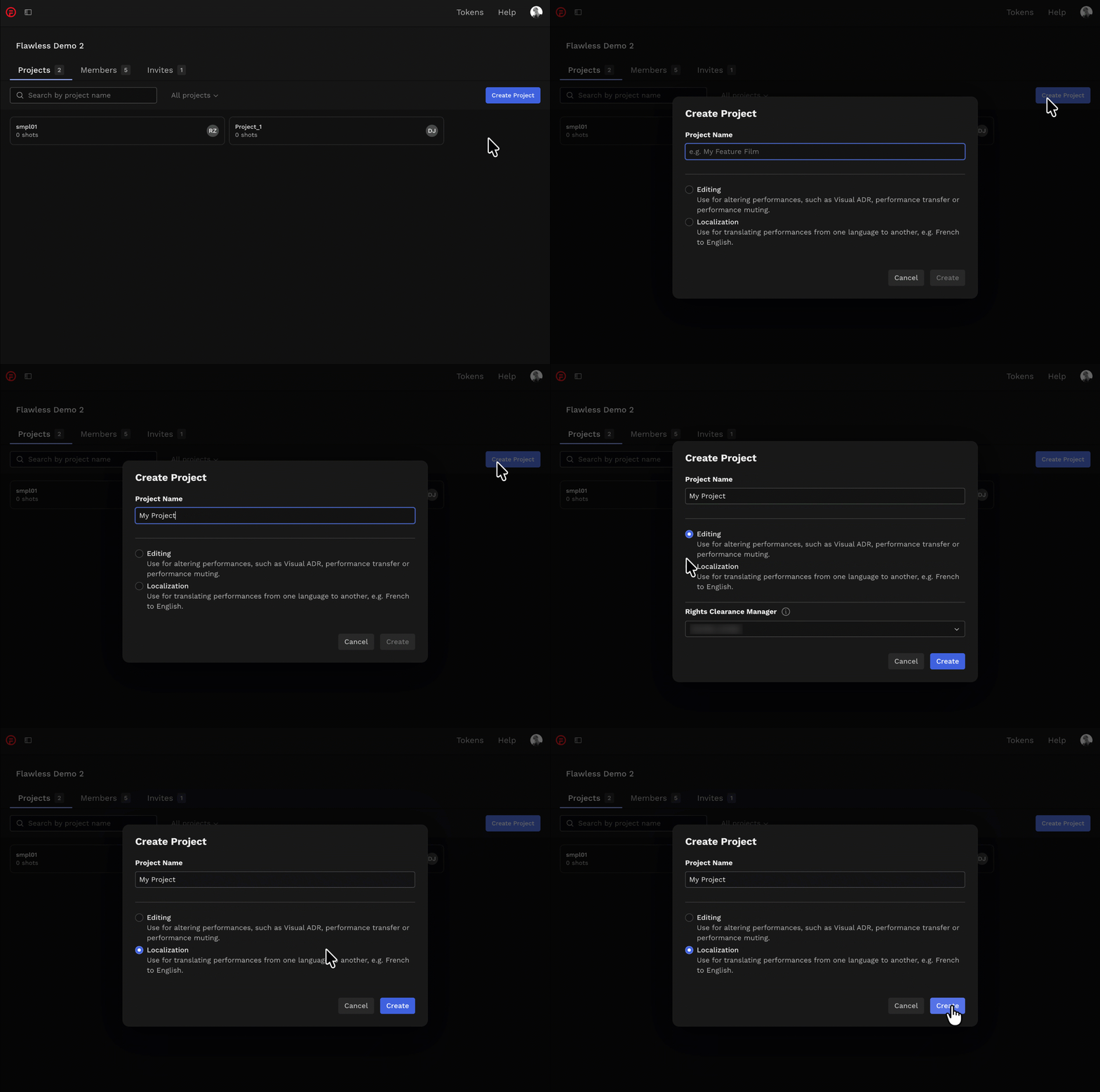
- Log in via https://deepeditor.flawless.app/projects
- Select New Project
- Give the project a name
- Select a project type: Editing or Localization
- If creating an Editing project, assign a Rights Clearance Manager from your workspace
Your project will be created and you will be taken to the project dashboard.
Editing vs Localization Projects
Choosing Editing or Localization as your project type determines how performer consent is managed and whether the Artistic Rights Treasury (A.R.T.) consent workflow is used.
Editing Project
Select the Editing project type when you intend to make creative changes, such as new lines of dialogue or transferring performances between shots - for example, In-Vision ADR, Performance Transfer, or Performance Editing.
An Editing project uses the Artistic Rights Treasury (A.R.T.) consent workflow, and you will be prompted to assign a Rights Clearance Manager.
All projects created in the Avid Extension default to the Editing project type.
Localization Project
Select the Localization project type if you are translating performances from one language to another and if your production includes a legal Dubbing Agreement, or you choose to manage consent outside of the DeepEditor tool..
Selecting Localization means you can bypass the Artistic Rights Treasury (A.R.T.) consent workflow.
Assigning a Rights Clearance Manager
In an Editing project, the Rights Clearance Manager (RCM) is responsible for gathering artist consent for creative changes. This role is typically held by a post producer, supervisor, or whoever is responsible for rights clearances on your production.
To be assigned, the Rights Clearance Manager must already be a member of your workspace and have a DeepEditor account. Once assigned, they will receive consent requests when a vub export is ready for review.
Note that multiple Rights Clearance Managers can be assigned to a project, so if the desired person is not yet part of your workspace, they can be added at a later point.
Learn more about the consent and the RCM role in The Artistic Rights Treasury
Project Settings
If you are unsure whether an existing project is an Editing or Localization project, you can see the project type by going to the Project Settings, accessed by selecting the gear icon at the top-left of the screen, next to the Projects drop-down.
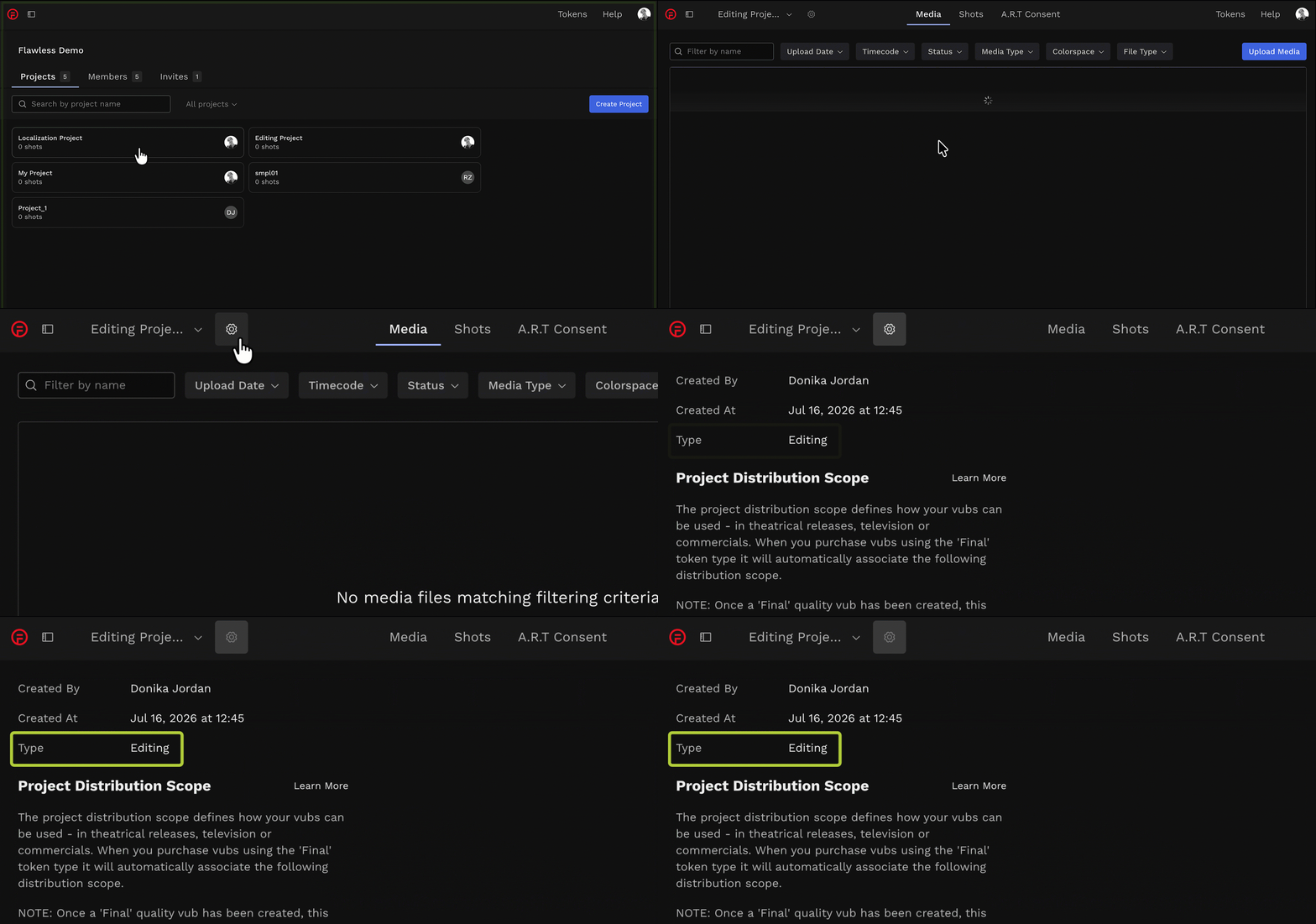
In the Settings you will see:
- Who created the project
- The date it was created
- If the project type is Editing or Localization
- The Project Distribution Scope
- Consent Management (Editing project type only)
- Roles (Editing project type only)
An alternative way to see if an existing project is Editing or Localization is to check the tabs at the top of the screen - if it's an Editing project you will see an A.R.T. Consent tab.
Read next: Workflow Overview