
Refining Mouth Shapes
It’s important to realize that, in the real world, not every sound is visibly articulated. It’s easy to try to make every sound clearly defined, but this is not the way people talk.
Concentrate on the key sounds with a focus on making sure the mouth shapes obey the ground rules for being physically able to form them.
It is recommended to first check and correct the Primary mouth shapes across the whole shot to make sure they are formed correctly. Once checked, render and review your shot.
PRIMARY mouth shapes:
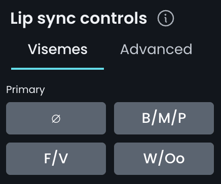
The Neutral Viseme button, shown as ∅, nullifies any viseme override values at the selected frame. The neutral anchor keyframe itself does not create a mouth shape - it provides a zero-value boundary so the viseme does not continue influencing the surrounding performance.
Learn more about using the neutral viseme button here.
After reviewing the Primary shapes, check any remaining problem areas for these Secondary mouth shapes to identify and refine outstanding issues.
SECONDARY mouth shapes:
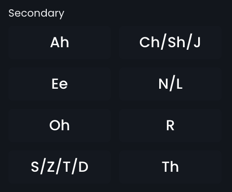
Note: K/G have no dedicated viseme, as they are largely invisible mouth shapes. See How do I create a K or G mouth shape? in the Refinement FAQs.
Before starting, make sure you are familiar with the Refinement Best Practices.
Download the handout Refinement Step 4: Mouth Shape Pass for reference.
More downloads are available here.
Lip Sync Controls
DeepEditor has two forms of Lip Sync Controls. These are:
Visemes - your primary controls - intuitive presets for the mouth shapes needed for key sounds. This allows you to work faster and focus on performance rather than specific facial anatomy.
- For the majority of shots, Visemes will meet your refinement needs.
Advanced - granular controls for specific parts of the face. These should only be used in cases where the Viseme controls do not achieve the desired result. This can involve:
- Making very specific facial adjustments
- Correcting edge cases
- Layering subtle refinements on top of a viseme
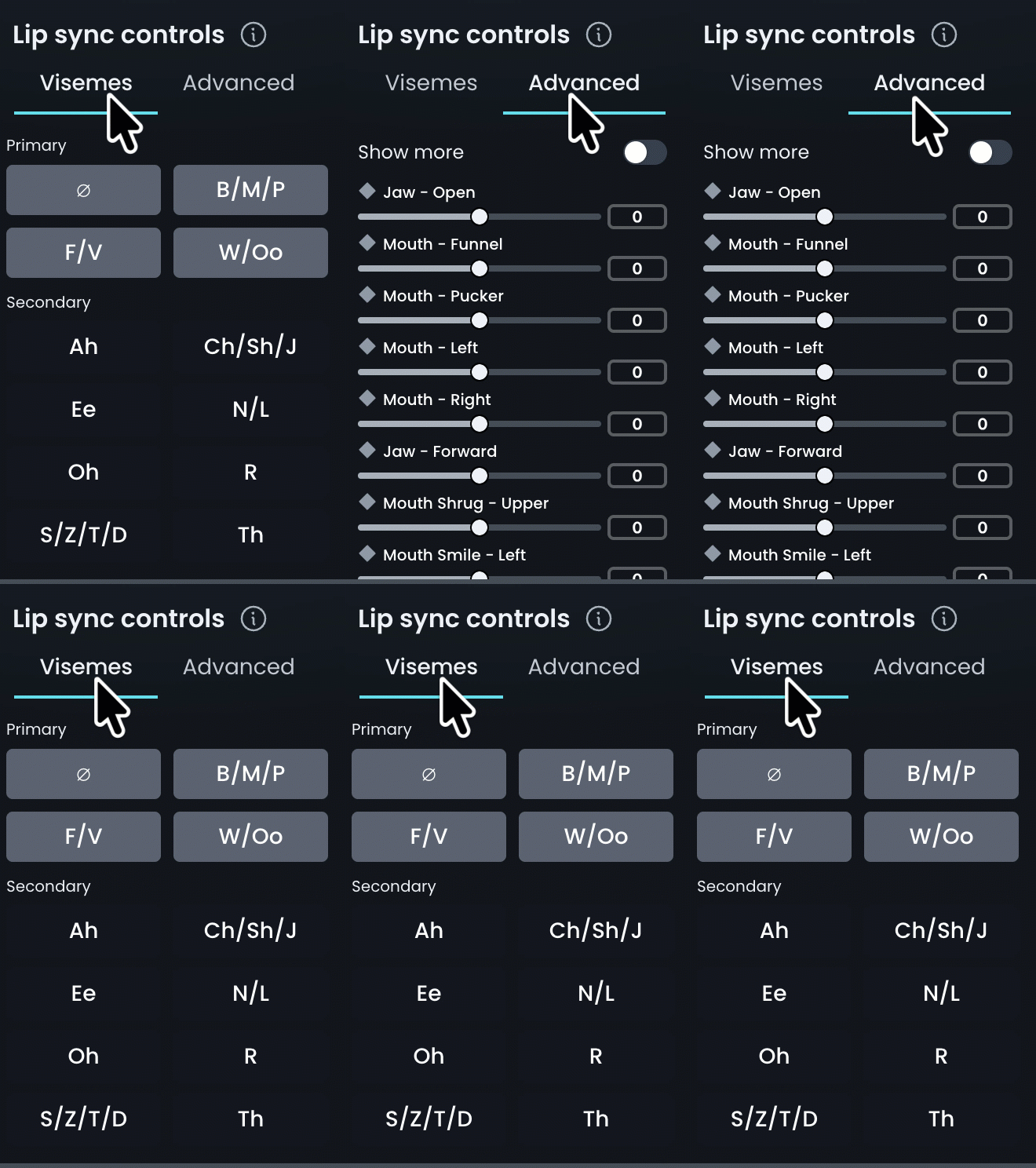
Before starting, make sure you know how to operate the Lip Sync Controls.
In order to adjust lip sync correctly, you must understand the correct timings and mouth shapes for each sound. If you cannot achieve the correct timing and shape with Visemes, only then proceed to using the Advanced controls.
Refer to the guide below for how to assess and achieve each viseme.
Visemes
B/M/P (e.g. “tuBe”, “Mat” , “caP”)
TIMING AND SHAPES
B & P:
- The lips should be pressed together on the frame before the sound (and possibly the frame before that too, depending on the strength of the B or P).
- The lips must release from each other when the B & P sounds start.
M:
- The M sound occurs only while the lips are closed.
- The lips release when the next sound occurs.
VISEME CONTROLS
- Increasing the B/M/P strength between 0 and 100 (full normal strength) will bring the jaw to a fractionally open position and the top lip down slightly to press against the bottom lip.
- Increasing the B/M/P strength from 100 to 300 (full strong shape) will press the lips together more, widening slightly.
- Setting the B/M/P strength to a value below zero will do the opposite - opening up the lips and jaw to soften, or release from, an existing B/M/P.
- In the unlikely event that you are completely unhappy with the existing mouth shape and want to remove it before applying the viseme, then reduce the Driving Data Scale to zero.
Not getting the result you need? See the Advanced controls guide here.
F/V (e.g. “Fate”, “turF”, “Velcro”)
TIMING AND SHAPES
-
F & V sounds only occur while the bottom lip is in contact with the top teeth.
-
No lower teeth should be visible.
VISEME CONTROLS
- Increasing the F/V strength between 0 and 100 (full normal strength) will bring the jaw to a position where the bottom lip should make contact with the top teeth, while lifting the top lip enough to ensure the lips don't seal.
- Increasing the F/V strength from 100 to 300 (full strong shape) will press the bottom lip more firmly on the top teeth and lift the top lip a little more to 'snarl'.
- Setting the F/V strength to a value below zero will do the opposite - opening up the jaw and relaxing the top lip to soften, or release from, an existing F/V.
- In the unlikely event that you are completely unhappy with the existing mouth shape and want to remove it before applying the viseme, then reduce the Driving Data Scale to zero.
Not getting the result you need? See the Advanced controls guide here.
W/Oo (e.g. “hoWever”, “When”, “cOOl”, “mOve”)
TIMING AND SHAPES
- W and Oo sounds occur with a rounding of the lips and a small lip opening.
- The Oo sound is heard while the mouth shape is held.
- The W mouth shape is strongest on the frame before the peak of the sound, which is generated as the lips releases into the next sound.
VISEME CONTROLS
- Increasing the W/Oo strength between 0 and 100 (full normal strength) will set the jaw to an open position while increasing pucker and lowering the top lip slightly.
- Increasing the W/Oo strength from 100 to 300 (full strong shape) will further strengthen the shape without opening the jaw further.
- Setting the W/Oo strength to a value below zero will do the opposite - closing up the jaw and widening the mouth to soften, or release from, an existing W/Oo.
- In the unlikely event that you are completely unhappy with the existing mouth shape and want to remove it before applying the viseme, then reduce the Driving Data Scale to zero.
Not getting the result you need? See the Advanced controls guide here.
S/Z/T/D (e.g. “Sausages”, “haZy”, “poTaToes”, “faDes”)
TIMING AND SHAPES
- Using Audio Scrubbing, find the frame or frames where you hear the ‘hiss’ of the S or Z sounds, or the frame before you hear the ‘pop’ of the T or D.
- Typically, the mouth shape for S/Z is made while the sound is heard.
- Typically the mouth shape for T/D is made the frame before the sound is heard.
- The lips must not be sealed.
- There should ideally be some visibility of the teeth with no visible gap between them.
- The jaw for T/D sounds can sometimes be fractionally more open than for S/Z sounds.
VISEME CONTROLS
- Increasing the S/Z/T/D strength between 0 and 100 (full normal strength) will set the jaw to a slightly open position.
- Increasing the S/Z/T/D strength from 100 to 300 (full strong shape) will widen and lift the mouth corners for emphasis.
- Setting the S/Z/T/D strength to a value below zero will do the opposite - moving the jaw in the reverse direction and lowering the mouth corners soften, or release from, an existing S/Z/T/D.
- In the unlikely event that you are completely unhappy with the existing mouth shape and want to remove it before applying the viseme, then reduce the Driving Data Scale to zero.
Not getting the result you need? See the Advanced controls guide here.
Th (e.g. “THick”, “paTH”)
TIMING AND SHAPES
- The Th sound only occurs while forming the Th mouth shape.
- The Th shape involves the tongue touching the underside of the top teeth, meaning that it can peek out between the teeth. DeepEditor does not currently control the tongue, so to make a Th shape work, ensure the jaw is open just enough to allow for a hypothetical tongue peeking out.
VISEME CONTROLS
- Increasing the Th strength between 0 and 100 (full normal strength) will set the jaw to a position open enough for the tongue to theoretically be between the teeth.
- Increasing the Th strength from 100 to 300 (full strong shape) will widen the mouth slightly for emphasis.
- Setting the Th strength to a value below zero will do the opposite - moving the jaw in the reverse direction and narrowing the mouth slightly to soften, or release from, an existing Th.
- In the unlikely event that you are completely unhappy with the existing mouth shape and want to remove it before applying the viseme, then reduce the Driving Data Scale to zero.
Not getting the result you need? See the Advanced controls guide here.
Ch/Sh/Dge/J (e.g. “CHannel”, “claSH”, “fuDGE”, “aJar”)
TIMING AND SHAPES
- The lips should not be sealed.
- There should be little to no gap between the teeth.
- The lips often funnel outward.
- These sounds are typically heard as the mouth is starting to release from the position, except for elongated Sh sounds.
VISEME CONTROLS
- Increasing the Ch/Sh/Dge/J strength between 0 and 100 (full normal strength) will set the jaw to a slightly open position and start funnelling the lips.
- Increasing the Ch/Sh/Dge/J strength from 100 to 300 (full strong shape) will funnel the lips more for emphasis with very little further jaw adjustment.
- Setting the Ch/Sh/Dge/J strength to a value below zero will do the opposite - moving the jaw in the reverse direction and flattening the lips to soften, or release from, an existing Ch/Sh/Dge/J.
- In the unlikely event that you are completely unhappy with the existing mouth shape and want to remove it before applying the viseme, then reduce the Driving Data Scale to zero.
Not getting the result you need? See the Advanced controls guide here.
R (e.g. “cRash”, “eRode”)
TIMING AND SHAPES
- The lips should curl slightly outwards.
- There should be a slight rounding of the lips.
- The opening between the lips should be small.
- The peak of a R mouth shape should be the frame before we hear the peak of the sound – which occurs as the shape is released.
VISEME CONTROLS
- Increasing the R strength between 0 and 100 (full normal strength) will set the jaw to a fairly closed position and start slightly funnelling and puckering the lips.
- Increasing the R strength from 100 to 300 (full strong shape) will funnel the lips more for emphasis and close the jaw a little more.
- Setting the R strength to a value below zero will do the opposite - moving the jaw in the reverse direction and flattening the lips to soften, or release from, an existing R.
- In the unlikely event that you are completely unhappy with the existing mouth shape and want to remove it before applying the viseme, then reduce the Driving Data Scale to zero.
Not getting the result you need? See the Advanced controls guide here.
N/L (e.g. “paNic”, “New”, “miLk”, “baLLast”)
TIMING AND SHAPES
- The lips should not be sealed.
- There should be a small visible gap between the teeth. N/L is formed by the tongue touching the roof of the mouth, so we focus the jaw opening to make this physically possible.
- The N and L sounds are heard when the mouth releases from this position.
VISEME CONTROLS
- Increasing the N/L strength between 0 and 100 (full normal strength) will set the jaw to a slightly open position and start lifting the top lip slightly.
- Increasing the N/L strength from 100 to 300 (full strong shape) will open the jaw further without changing the top lip any further.
- Setting the N/L strength to a value below zero will do the opposite - moving the jaw in the reverse direction lowering the top lip a little to soften, or release from, an existing N/L.
- In the unlikely event that you are completely unhappy with the existing mouth shape and want to remove it before applying the viseme, then reduce the Driving Data Scale to zero.
Not getting the result you need? See the Advanced controls guide here.
Ah (e.g. “mAt”, “flAp”)
TIMING AND SHAPES
- The peak of the Ah sound should match the peak of the jaw opening.
- The lips and jaw must not be closed.
- The size of the jaw opening should match the performance size.
VISEME CONTROLS
- Increasing the Ah strength between 0 and 100 (full normal strength) will increasingly open the jaw and start lifting the top lip slightly.
- Increasing the Ah strength from 100 to 300 (full strong shape) will open the jaw further and start pulling back the mouth corners.
- Setting the Ah strength to a value below zero will do the opposite - closing the jaw and relaxing the mouth corners to soften, or release from, an existing Ah.
- In the unlikely event that you are completely unhappy with the existing mouth shape and want to remove it before applying the viseme, then reduce the Driving Data Scale to zero.
Not getting the result you need? See the Advanced controls guide here.
Ee (e.g. “hEEd”, “happilY”)
TIMING AND SHAPES
- There should be a light jaw opening, leaving a slight separation between the teeth
- There should be an increased mouth width; it can look like a smile.
- The peak of the mouth shape should match the peak of the sound.
VISEME CONTROLS
- Increasing the Ee strength between 0 and 100 (full normal strength) will increasingly open the jaw.
- Increasing the Ee strength from 100 to 300 (full strong shape) will open the jaw further and start widening the mouth.
- Setting the Ee strength to a value below zero will do the opposite - closing the jaw and narrowing the mouth to soften, or release from, an existing Ee.
- In the unlikely event that you are completely unhappy with the existing mouth shape and want to remove it before applying the viseme, then reduce the Driving Data Scale to zero.
Not getting the result you need? See the Advanced controls guide here.
Oh (e.g. “bOne”, “mOAt”)
TIMING AND SHAPES
- The lips should be rounded and slightly open.
- The Oh sound can be heard as the mouth shape is forming, with the most definition coinciding with strongest part of the sound.
VISEME CONTROLS
- Increasing the Oh strength between 0 and 100 (full normal strength) will set the jaw to a slightly open position and increasingly narrow and pucker the lips.
- Increasing the Oh strength from 100 to 300 (full strong shape) will not round the mouth much more but increasingly open the jaw.
- Setting the Oh strength to a value below zero will do the opposite - moving the jaw in the reverse direction and widening the mouth to soften, or release from, an existing Oh.
- In the unlikely event that you are completely unhappy with the existing mouth shape and want to remove it before applying the viseme, then reduce the Driving Data Scale to zero.
Download the complete Refinement Process and Visemes Guide.
More downloadable guides are available here.
Read Next: Advanced Lip Sync Controls