
Overview
The Advanced controls are granular controls for specific parts of the face. These should only be used in cases where using the Viseme controls has not achieved the desired result. This can involve:
- making very specific facial adjustments
- correcting edge cases
- layering subtle refinements on top of a viseme
Before starting, make sure you know how to operate the Lip Sync Controls.
Refer to the guide below for how to assess and achieve each key viseme using the Advanced controls. Like the guidance for the Viseme controls, they should be approached as a set of Primary and Secondary mouth shapes:
PRIMARY mouth shapes:
SECONDARY mouth shapes:
Note: There is no entry for K/G, as these are largely invisible mouth shapes. See How do I create a K or G mouth shape? in the Refinement FAQs.
Refining using the Advanced Controls
B/M/P (e.g. “tuBe”, “Mat” , “caP”)
To use the Advanced controls you must understand the correct timing and shape for this viseme.
CONTROLS TO USE
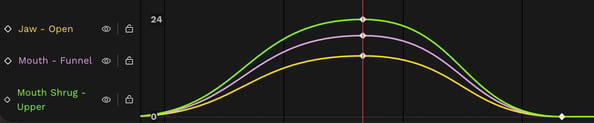
If the lips are not closed when they should be for a B, M or P, then close them with the following overrides:- Jaw - Open (negative value)
- Close the jaw to bring the bottom lip up to meet the top lip. Use in tandem with ‘Mouth Shrug - Upper’ so that the lips come together in unison.
- Mouth Shrug - Upper (negative value)
- Lower the top lip to bring it down to meet the bottom lip. Use in tandem with ‘Jaw - Open’ so that the lips are coming together in unison.
- Optional: Mouth - Funnel (negative value)
-
- Pull the lips inwards and press slightly together with a gentle negative value.

- If the lips are closed in your vub when they are meant to be releasing, then use the reverse of the actions above i.e. to open the lips use:
- Jaw - Open (positive value)
- Mouth Shrug - Upper (positive value)
-
Optional: Mouth - Funnel (positive value)
VIDEO DEMONSTRATION
Watch this short video demonstrating how to create the 'B/M/P' mouth shapes.
F/V (e.g. “Fate”, “turF”, “Velcro”)
To use the Advanced controls you must understand the correct timing and shape for this viseme.
CONTROLS TO USE
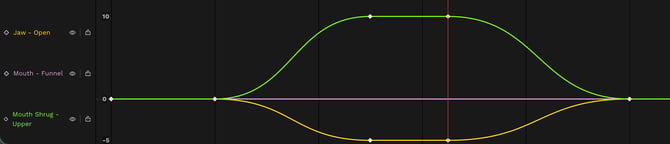
If the bottom lip is not making contact with the top teeth on the desired frames, then achieve this with the following overrides:- Jaw - Open (negative value)
- Close the jaw with a negative value so that the bottom lip covers at least some of the top teeth.
- Mouth Shrug – Upper (positive value)
- Once the jaw has been adjusted such that the bottom lip is in contact with the top teeth, ensure that the lips are now not sealed by raising the top lip if necessary.
- Optional: Mouth Roll – Lower (positive value)
- This brings the lower lip inward and can help give the impression that the lower lip is pressing against the bottom teeth. Fs in particular can be formed using different parts of the bottom lip making contact with the teeth, so use your judgement of how the actor would form an F.
- Optional: Mouth – Funnel (positive value)
- Mouths can purse together when saying F or V. This can help create this slightly rounded shape.
VIDEO DEMONSTRATION
Watch this short video demonstrating how to create the 'F/V' mouth shapes.
W/Oo (e.g. “hoWever”, “When”, “cOOl”, “mOve”)
To use the Advanced controls you must understand the correct timing and shape for this viseme.
CONTROLS TO USE
If the W/Oo shape is not sufficiently formed, then achieve this with the following overrides:
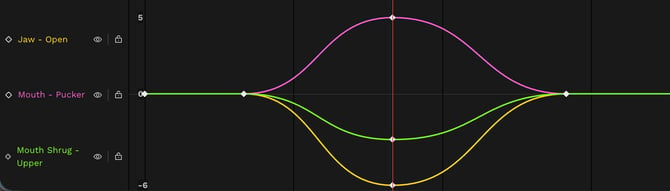
- Jaw - Open (positive or negative value)
- The jaw typically opens a little in the forming of a W/Oo, so ensure that this is happening – but only a little.
- Mouth – Pucker (positive value)
-
- To create a more rounded shape
- Mouth Shrug - Upper (negative value)
-
- Slightly lower the top lip to bring it closer to the bottom lip and reduce/eliminate the visibility of the top teeth.
VIDEO DEMONSTRATION
Watch this short video demonstrating how to create the 'W/Oo' mouth shapes.
S/Z/T/D (e.g. “Sausages”, “haZy”, “poTaToes”, “faDes”)
To use the Advanced controls you must understand the correct timing and shape for this viseme.
CONTROLS TO USE
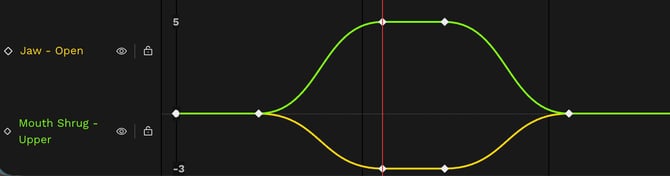
If the mouth is too open for a S/Z/T/D to be formed, use the following controls:
- Jaw - Open (negative value)
-
- Adjust the jaw so there is little to no gap between the teeth.
- Mouth Shrug – Upper (positive value)
-
- After setting the jaw correctly, ensure the lips do not seal by raising the top lip, if needed.
VIDEO DEMONSTRATION
Watch this short video demonstrating how to create the 'S/Z/T/D' mouth shapes.
Th (e.g. “THick”, “paTH”)
To use the Advanced controls you must understand the correct timing and shape for this viseme.
CONTROLS TO USE
If the Th shape is not sufficiently formed, then achieve this with the following overrides:
- Jaw - Open (positive or negative value)
- Adjust the jaw so there is a slight gap between the teeth (note that you don’t actually have to see the teeth, just to set the jaw to the right opening.
- Mouth Shrug – Upper (positive value)
-
- After adjusting the jaw, raise the top lip if necessary to ensure the lips are not sealed.
- Optional: Mouth - Funnel (negative value)
-
- Th shapes can involve a widening of the mouth corners. If desired, add a gentle negative value to ‘Mouth - Funnel’ to achieve this.

VIDEO DEMONSTRATION
Watch this short video demonstrating how to create the 'Th' mouth shapes.
Ch/Sh/Dge/J (e.g. “CHannel”, “claSH”, “fuDGE”, “aJar”)
To use the Advanced controls you must understand the correct timing and shape for this viseme.
CONTROLS TO USE
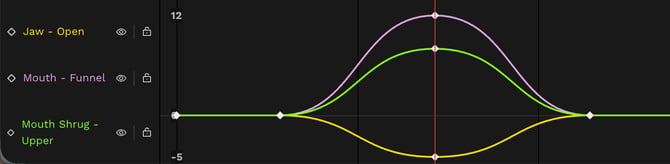
If the Ch/Sh/Dge/J shape is not sufficiently formed, then achieve this with the following overrides:
- Jaw - Open (negative value)
- Close the jaw until you have nearly-touching teeth.
- Mouth – Funnel (positive value)
-
- Add some curling outwards of the lips if needed.
- Optional: Mouth Shrug – Upper (positive or negative value)
-
- These mouth shapes sometimes show the top row of teeth, so lift the top lip if needed. Conversely, if ‘Mouth - Funnel’ has overexposed the top teeth, you can lower the top lip if needed.
VIDEO DEMONSTRATION
Watch this short video demonstrating how to create the 'Ch/Sh/Dge/J' mouth shapes.
R (e.g. “cRash”, “eRode”)
To use the Advanced controls you must understand the correct timing and shape for this viseme.
CONTROLS TO USE
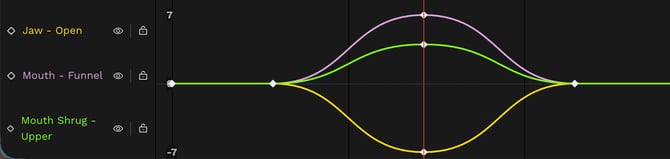
- Mouth – Funnel (positive value)
- To round the mouth and curl the lips outwards.
- Jaw – Open (positive or negative value)
- If the jaw looks too open, slightly close it; however, it should never be fully closed.
- Mouth Shrug – Upper (positive value)
- If the adjustment to the jaw has resulted in sealed lips, slightly raise the top lip to part them.
VIDEO DEMONSTRATION
Watch this short video demonstrating how to create the 'R' mouth shape.
N/L (e.g. “paNic”, “New”, “miLk”, “baLLast”)
To use the Advanced controls you must understand the correct timing and shape for this viseme.
CONTROLS TO USE
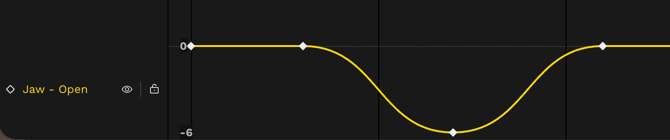
If the N/L shape is not sufficiently formed, then achieve this with the following overrides:- Jaw - Open (negative value)
- If there is no visible gap between the teeth, open the jaw a little.
- Optional: Mouth Shrug – Upper (positive value)
- Once the jaw is adjusted then, if the lips are still sealed, raise the top lip a little to help part them.
VIDEO DEMONSTRATION
Watch this short video demonstrating how to create the 'N/L' mouth shape.
Ah (e.g. “mAt”, “flAp”)
To use the Advanced controls you must understand the correct timing and shape for this viseme.
CONTROLS TO USE
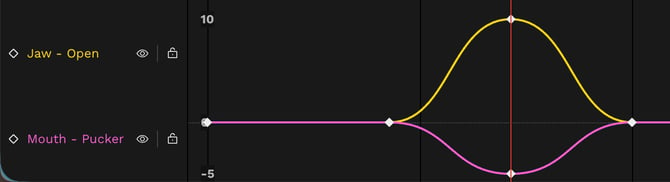
- Jaw - Open (positive value)
-
- Open the jaw enough to match the audio performance size.
- Optional: Mouth - Pucker (negative value)
-
- If there is any rounding of the mouth, reduce or eliminate this.
VIDEO DEMONSTRATION
Watch this short video demonstrating how to create the 'Ah' mouth shape.
Ee (e.g. “hEEd”, “happilY”)
To use the Advanced controls you must understand the correct timing and shape for this viseme.
CONTROLS TO USE
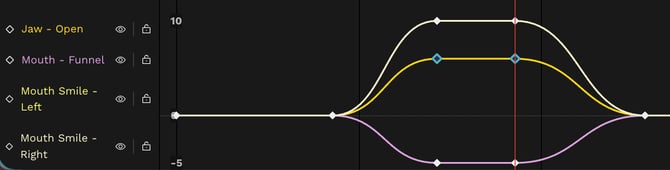
- Jaw – Open (positive value)
-
- Ensure the jaw has a light opening.
- Mouth Smile - Left & Mouth Smile – Right (positive value)
-
- Add ‘Mouth Smile - Left’ and ‘Mouth Smile - Right’, typically in equal proportions, to emphasize an Ee shape.
- Optional: Mouth - Funnel (negative value)
-
- Using a small negative value of ‘Mouth - Funnel’ can create the look of the lips pressing against the teeth that can occur when with an Ee sound.
VIDEO DEMONSTRATION
Watch this short video demonstrating how to create the 'Ee' mouth shape.
Oh (e.g. “bOne”, “mOAt”)
To use the Advanced controls you must understand the correct timing and shape for this viseme.
CONTROLS TO USE
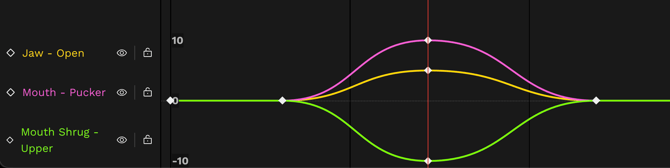
- Mouth - Pucker (positive value)
-
- To round the lips.
- Mouth Shrug - Upper (negative value)
-
- To lower the top lip, reducing the gap between the lips if too big.
- Jaw - Open (positive value)
-
- To open the jaw, in case a gap needs to be created/increased between the teeth (even though the teeth will likely not be visible).
- To open the jaw, in case a gap needs to be created/increased between the teeth (even though the teeth will likely not be visible).
- Optional: Mouth - Smile L/R (negative value)
-
- To lower the mouth corners, if additional rounding is needed.
Download the Advanced Lip Sync Controls Guide.
More downloadable guides on Refinement are available here.
Read next: Refinement Troubleshooting & FAQs