
Remember to try the Flawless Help chatbot when you have any questions!
-
Prepare Your Media
-
Create Shots & Vubs
-
Export and Download
-
Tokens, Payments and Refunds
-
Contacting Support
Prepare Your Media
Does the Source shot need to have audio?
Source media doesn't need to have audio (you will still be able to generate a vub without it), but including it gives you a helpful reference point during refinement.
If your Source media was uploaded without audio, you won't hear anything when playing back the Original shot in the Refinement tool.
Create Shots & Vubs
What is a vub?
-
A Visual Dub - a vub - is a visual adjustment to an actor's face that synchronises their mouth movements to new dialogue or an alternative performance. See What is a Vub? for more detailed information.
What are the vub quality levels available and how should I use them?
-
Please read about the DeepEditor vub quality levels here.
How do I delete media?
-
Media files cannot currently be deleted from the Media Library. However, if you have added media to a shot and no vubs have been created using that media, then they can be deleted from the Shot Media tab for that shot.
Can I delete a vub?
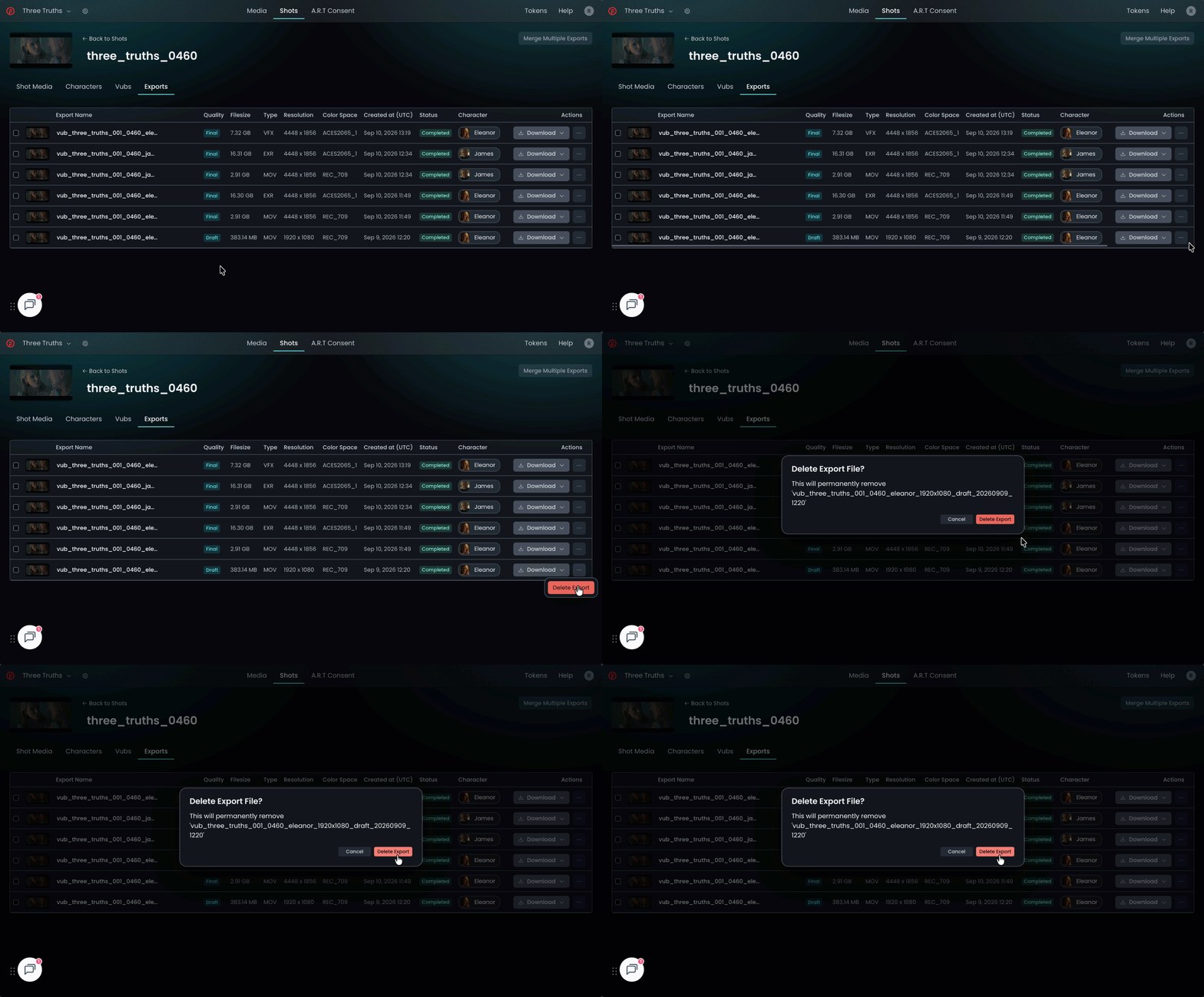
No, it is currently not possible to delete a vub on the Vubs tab. However, you can delete the export of a vub from the Exports tab by clicking on the three dots under the Actions column and selecting Delete Export.
Does DeepEditor support interlaced media?
-
No - DeepEditor does not support interlaced media directly - all media will be treated as progressive.
Does DeepEditor support anamorphic media?
-
No - the pixel aspect ratio (PAR) must be 1:1 (square). See Supported Media Formats for full guidance.
What media formats does DeepEditor support?
-
Full details of supported media formats and color spaces can be found below:
Should I upload my media before or after color grading / applying a LUT?
-
Media can be uploaded to DeepEditor before or after color grading or applying a LUT. The important consideration is that the color of your vub export will be baked in and so can not be undone. Uploading ungraded media retains the flexibility to apply color grades or LUTs to the vub export.
My source EXRs are in ACEScg, do I need to do anything to make them bright enough for the character detection to work?
No, you don't need to brighten ACEScg EXRs simply because they look dark in raw linear space. However, brightening genuinely underexposed footage can significantly improve character detection.
Perceived Darkness vs. Actual Underexposure
- Viewing Raw ACEScg: Linear ACEScg EXRs naturally appear flat and dim when viewed directly without a Display Transform (ODT/RRT). DeepEditor automatically applies color management, so if a shot only looks dark because it is un-tonemapped linear data, you do not need to adjust it.
- Truly Dark Footage: Face and character detection algorithms rely on feature contrast. If the underlying footage is genuinely dim or underexposed—even after applying a proper display transform—the detection tools will struggle to pick up facial features.
When to Brighten Your EXRs
- Genuinely Underexposed Shots: Lift the exposure or boost the midtones on dark clips before exporting for DeepEditor. Giving the system higher feature contrast will yield faster and more accurate face detection.
- Properly Exposed Shots: Leave the EXRs as they are. Ensure you select the correct input color space in DeepEditor.
Recommended Workflow
- Preview your EXRs with a standard ACES Rec.709 display view transform in your NLE or compositing software to check true brightness.
- If the face remains hard to distinguish visually, apply an exposure gain pass to help the detection algorithms (you will need to reverse this later when you add the Final vub EXRs to your timeline).
- Export and upload to DeepEditor.
Can I / should I add handles to my shot?
-
If you want more flexibility with the duration of your vub in your edit, consider adding handles to your Source media before uploading. Once uploaded, the media duration cannot be changed. To add handles, a new piece of media, with handles added, should be uploaded.
Does the audio in the Source media affect my vub?
-
No. The audio in the Source media will not affect the lip sync / performance of the vub. Only the Driving Data will influence your vub. The Source media audio is useful solely as a reference, if desired, when doing lip sync refinement.
How does the 'Representation' field for the Source media affect my vub?
-
The 'Representation' field for the Source media (set to either 'Proxy' or 'Original') does not affect the quality or handling of your vub. It is purely a user-set tag to aid organisation and is entirely optional.
What happens if my Driving Data is shorter or longer than my Source media?
-
If the Driving Data is longer than your Source media, DeepEditor will truncate your Driving Data so it ends at the same frame as the Source media.
-
If the Driving Data is shorter than your Source media, DeepEditor will effectively add silent audio padding up to the last frame of your Source media.
What is the difference between using Video Driving Data and Audio Driving Data?
- See here for an explanation.
Does Training Data need to be the same resolution as the Source media?
-
No, Training Data does not need to match the resolution, nor the file format (color, codec, etc) of the Source media. When upgrading your vub to Final quality, you should however be looking to use full quality Training Data rather than proxy media that may have been used in the Draft vub. See here for more information.
DeepEditor works by detecting, tracking, and analysing the face region of a performer, rather than the full frame. Because of this, the overall image resolution of the training data does not need to be identical to the source.
How much Training Data can I upload?
-
Currently, you can upload up to 6 video files of Training Data of which you can select up to 5000 frames to be used as Training Data for any given vub. See here for full guidance.
I've got final ADR to replace my temp ADR in my vub, what should I do?
-
If you had vubbed a shot using temp ADR as your Driving Data, but have now received final ADR and want to update your vub, add the final ADR as a new piece of Driving Data for your shot and create a new vub.
How do I stop a vub from being generated after triggering it?
- Currently there is no way to stop a vub being generated once it is triggered.
How long will my vub take to be created?
-
Vub creation: Creating the initial vub will typically take approximately 1-1.5 hours for an average duration shot (approximately 5 seconds). This time may vary according to shot duration, presence of Training Data, or shot complexity. If you haven't received an email notification of completion after 6 hours, contact support.
-
Rendering (in the Refinement tool): Rendering a change to your vub can vary based on the number of changed frames requiring re-rendering. The first render after vub completion will also take a fraction longer, but typically you should expect between 20 seconds and a couple of minutes.
What would happen to an in-progress vub, if I closed my browser?
-
Once a vub has been triggered, you can close your browser at any time. DeepEditor works in the cloud, so it's not necessary to keep the web page (or the Avid Extension) open after starting a vub creation. Once your vub has completed you will receive an email alert with a link to your newly created vub.
How do I rename a vub?
-
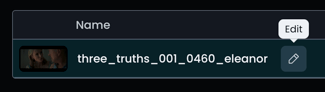
To rename a vub - or a shot - or a media library file, click on the pencil icon next to the name.
How can I change the driving data of a vub?
You can't edit the Driving Data of an existing vub directly - Driving Data is fixed once a vub is generated. Instead, add new Driving Data to the shot and generate a new vub using that. This keeps everything contained within the same shot rather than creating a separate one.
Steps for the DeepEditor Web App:
- Go to the Shots tab and open the shot containing your vub.
- In the Shot Media tab, click Add Driving Data, and upload your new Driving Data file.
- Once the new Driving Data has finished processing, click Generate Vub.
- Name your vub, select your desired quality level and click Next.
- Confirm the character you want to vub and click Next.
- Select the new Driving Data (along with the same Source media and Training Data, if used) and click Next.
- Confirm all details are correct and click Create.
Steps for the Flawless Avid Extension
To create a new version of your vub in the Avid Extension with different Driving Data, follow these steps:
- Select your shot in the Shots & Vubs list and hit Create Vub.
- Confirm the correct video/audio tracks and in/out points are set in your Avid timeline for your new Driving Data then click Load new from timeline in the Driving Data section of the extension panel.
- Once the Driving Data file has been processed it will appear in the Driving Data media list.
- Select it and click Create Vub.
See Avid Extension: Using Multiple Driving Data files and Avid Extension: Creating Your Vub for the complete workflow.
I vubbed ungraded Source media, how do I make it look like my offline media color?
-
If you have used ungraded Source media for your vub but want to cut it into your offline media timeline with a matching grade or LUT, you can either:
-
apply the matching grade or LUT to your vub media using a tool like Davinci Resolve, or:
- apply an approximate match grade in Avid / Premiere Pro using the in-tool color matching functionality.
-
How can I get the best results in DeepEditor?
-
see the guidance on what makes good Source media and Driving Data in the Prepare Your Media section of the Knowledge Base.
Can a model trained for one shot be re-used for another shot?
-
Within DeepEditor It is not currently possible to re-use a model trained for one shot on a different shot. However, new vubs created within a shot that use the same Source media and Training Data combination as an existing vub (i.e. when you are just changing the Driving Data) will re-use the model from the existing vub. This will result in a faster vub creation process.
Where does DeepEditor store media?
-
DeepEditor is a cloud-based application hosted on AWS and upholds the highest data security standards.
Does Flawless train their models using my uploaded footage?
-
No - Flawless does not use customer data to train models outside of the scope of your project. See here for more information.
Export and Download
How can I change the codec of my vub export?
-
You cannot currently change the codec of a vub export within DeepEditor. After your vub is downloaded you can use a third-party application such as Davinci Resolve to transcode your file.
Tokens, Payment and Refunds
How do I buy tokens?
-
Click on the Tokens button in the top right corner of the screen, then choose Buy Tokens.
-
Select the tokens you wish to buy and click on Proceed to checkout (via Stripe).
-
See DeepEditor Token Types and Distribution-Based Pricing to learn more about each token type and distribution scope.
-
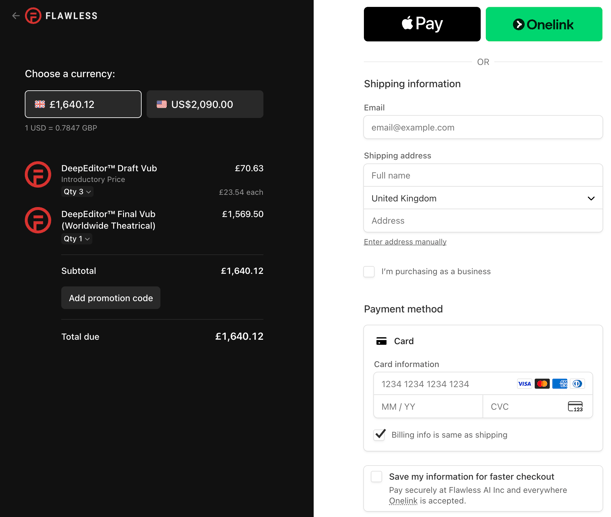
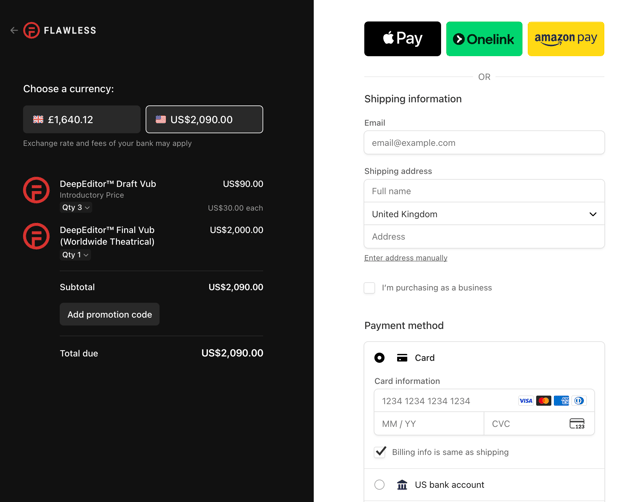
On the checkout page you will see your selected tokens, the total due and the payment options available for your chosen currency.
-
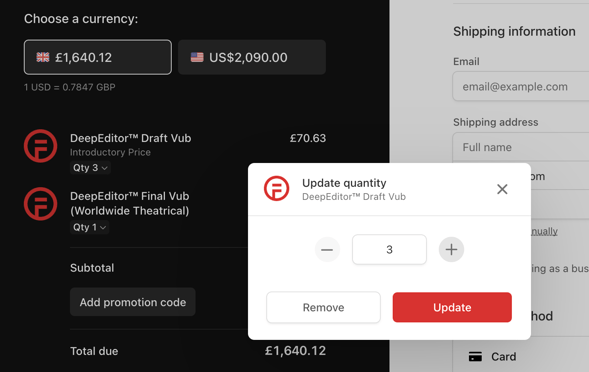
You may update your desired token quantity on this page.
-
Enter your name, billing address, and payment information. Then click Pay.
How much does a token cost?
-
The cost of a token depends on the token type and your selected distribution scope.
- Only one token is needed to create a vub.
-
See Token Types & Pricing for details.
How do I get a receipt for the tokens I purchased?
-
When you purchase a token, you will receive a receipt by email from Stripe. If you're unable to find it, please check your spam folder.
Which action in DeepEditor results in a charge to my account?
-
When you create a vub and click Create, a token will be deducted from your account.
-
There are no additional charges for refining, exporting or downloading vubs.
How long after payment will I see the purchased tokens in my account?
-
You should see the tokens in your account minutes after payment.
How long do tokens last, and do they expire?
-
Unless specifically stated, tokens do not expire.
Does DeepEditor save my credit card details?
-
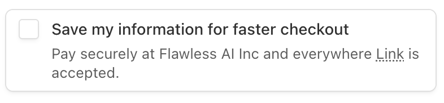
No, DeepEditor and Flawless never save your card details. Payment is managed via Stripe and card details are never saved by default. You have to actively select the option 'Save my card details for faster checkout' in order for your card details to be saved by Stripe.
How do I request a credit refund if an issue occurs?
-
Please contact support.
Do refinement changes and new exports cost tokens?
-
No, the initial token cost includes unlimited refinement changes and exports. Make as many lip sync changes as needed, free of charge.
Do I have to pay for the DeepEditor Avid Extension?
-
No. DeepEditor is a consumption-based service, so you only pay to create a vub. Having an account or installing our DeepEditor Avid Extension is free. See the costs of creating a vub based on quality level and distribution scope here.
Contacting Support
If you require assistance, the first place to try is the Flawless Help chatbot. It is available 24/7 to help you - you can find it in the bottom right of your screen inside the DeepEditor web app and in our Knowledge Base.
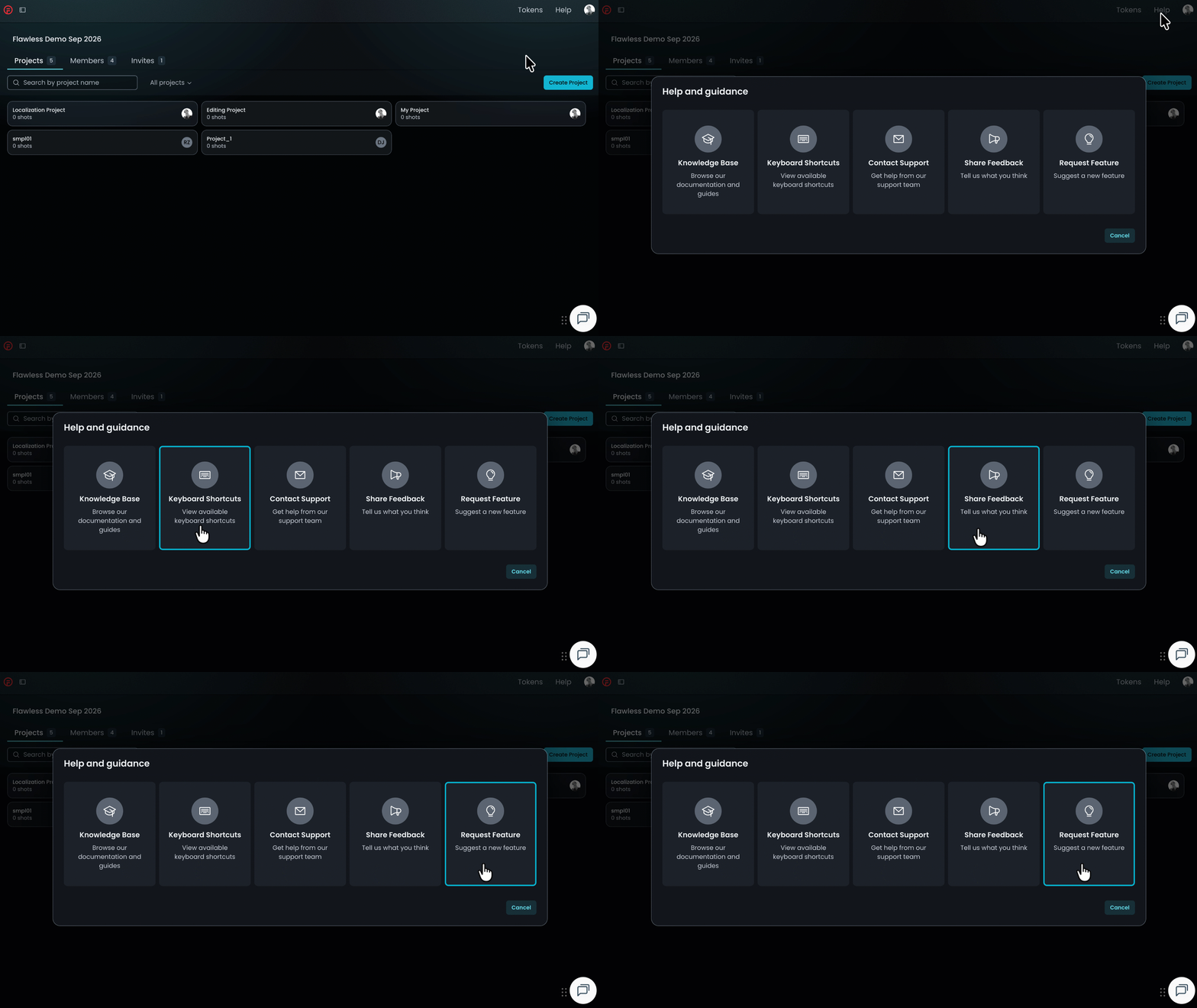
If the chatbot can't resolve your query, click Help in the top-right corner of DeepEditor to access the following options:
- Knowledge Base — search articles and try the Flawless Help chatbot again
- Keyboard Shortcuts - a full list of the keyboard shortcuts for the Refinement tool
- Contact Support — raise a Flawless Support ticket
- Share Feedback — share your experience of the product
- Request Feature — suggest ideas for new features
-
You can also email support@flawless.app directly at any time.