
At this stage, you will have generated your EXR image sequence and/or your high quality MOV of your Final quality vub with final lip sync. The next steps are:
- Regrain your vub output. Assuming that you degrained your Final quality media prior to uploading, you will now need to regrain the output.
- Review the image quality of your vub. This would be typically done using the EXR image sequence, but if the MOV is your delivery format, you can use that.
- If you conclude that your image quality is good, then you can deliver your Export to the conform.
- If, however, you decided there are some aspects of the image quality of the vub that need cleaning up, then you can generate a VFX Turnover Package. To do this, select your vub in the Vubs tab to open the panel on the right-hand side.
- On the panel, select Create Export.
- In the Vub Export panel that opens, select VFX Turnover Package.
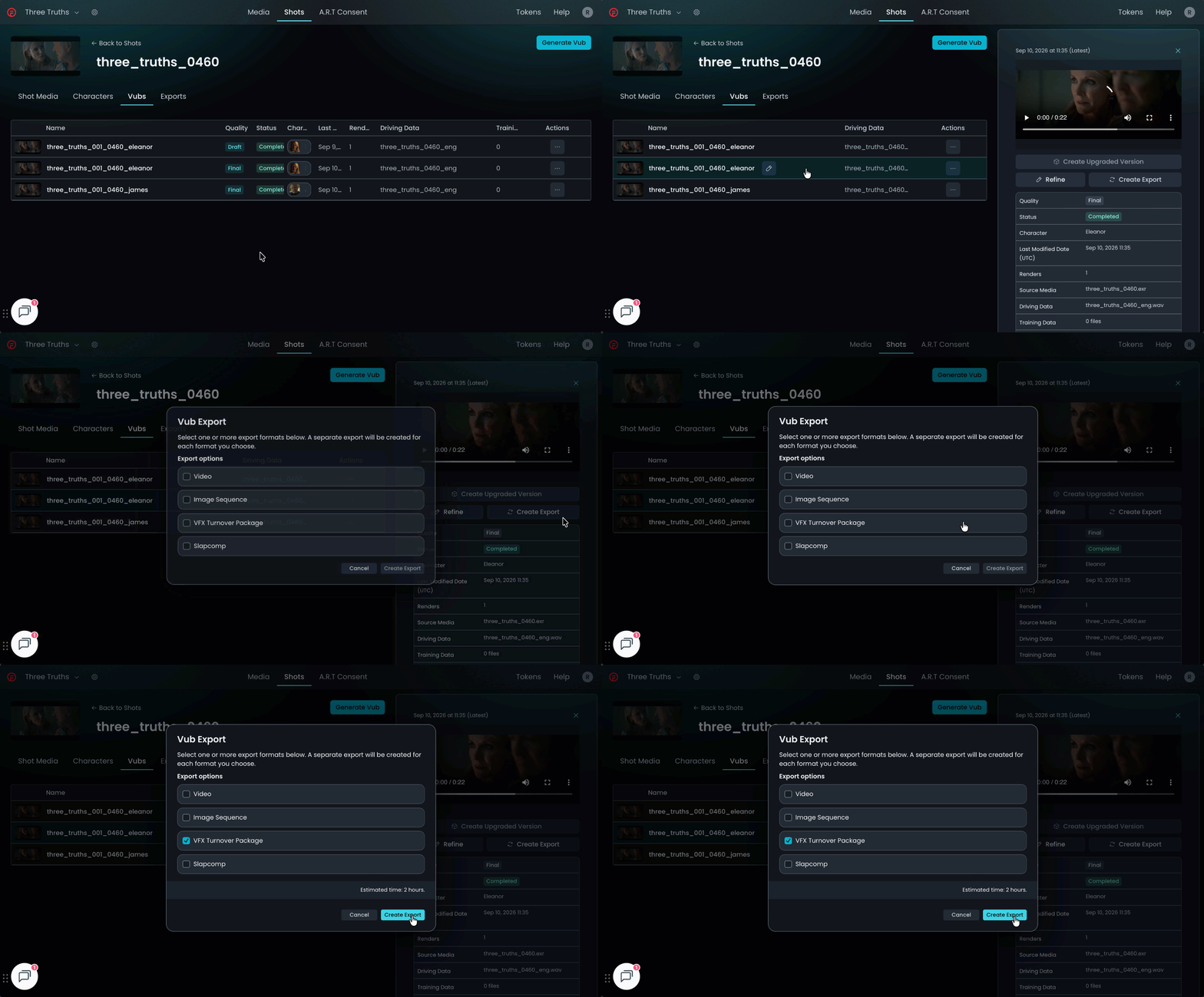
The VFX Turnover Package will appear as an item in the Exports tab, with the Type set to VFX.

When ready, you will be able to download this via MediaShuttle.
Guidance on the use of the VFX Turnover Package in software like Nuke can be found in this video.
Once cleanup is complete, the result can then be delivered to the conform.
Refer to Final Quality Vubbing Workflow for an overview of each step in the Final Quality Vubbing process and who should complete each step.