
Learn how vubbing can be applied to solve many common Editorial and Post-Production challenges.
In-Vision ADR
In-Vision ADR allows you to apply new or replacement dialogue, in vision, to an existing shot, without the need for reshoots or cutaways. The audience will always absorb a line of dialogue more easily when they see it spoken on-screen, so this approach gives maximum impact.

This is an audio-driven process. DeepEditor uses the new audio as Driving Data, syncing the actor's mouth movements to the new dialogue while retaining their original emotional performance.
Common scenarios:
- Script changes - The edit often reveals a better line or a structural issue. New dialogue can be experimented with, applied to an existing shot.
- Censorship editing - Explicit words or lines can be replaced with audience-friendly alternatives to achieve a lower certification or meet broadcaster delivery requirements.
- Consolidation - When scenes are cut for pace or runtime and the remaining shots no longer connect cleanly, dialogue can be re-written to bridge the edit.
Performance Transfer
Take a performance from one shot and apply it to a different shot. This is a video-driven process.
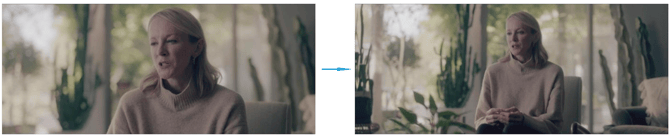
The Driving Data shot provides the facial expressions that are transferred to the target shot - no image data is transferred, only the performance itself - so is independent of lighting conditions and head pose differences between the two. Note however that audio must also be included in the Driving Data, only so that it is available to hear if refining the lip sync output.
Common scenarios:
- Best performance on the best frame size - The best performance isn't always captured in the preferred shot, so transfer it over. No more compromise between performance and visual storytelling.
- Propagating a performance across setups - If an actor delivered the desired performance on only one or two takes, that performance can be propagated across all setups to create a complete set of new dailies, avoiding the need for pickups or reshoots.
- Transferring performances across scenes - Because the process is independent of lighting and head pose, a performance or line of dialogue can be transferred from one scene to another, for story purposes.
Performance Editing
Performance Editing is the use of vubbing to solve common editorial rhythm challenges. In each case, the solution is achieved by editing the audio and applying it as Driving Data - no need to return to camera.

Common scenarios:
- Removing a line of dialogue - If a decision is made to remove a line, the associated dialogue should be edited out of the audio and the new audio applied as Driving Data.
- Removing lip flap - When holding on a shot for a beat after an actor finishes a line, any movement into subsequent dialogue - lip flap - can be removed simply by editing the unwanted dialogue out of the audio and applying it as Driving Data.
- Adjusting pace of delivery - If the editor wishes to change the pace of a delivery of a line - typically to make it faster - this can be achieved by editing the audio to close the gaps between words or phrases, then applying the edited audio as Driving Data.
Best Practices
When vubbing, it is important to check that the new dialogue will work with the physicality of the actor before generating the vub. Overall physical emphasis points and the emotion seen in the eyes must feel organic and coherent with the new dialogue.
A simple and effective method is to line up the new audio against the Source shot, then physically cover the lower half of the actor's face with your hand. Play the shot, and if you believe the actor could plausibly be saying the new dialogue underneath your hand, then the audio is likely to produce a good result.
Read Next: Data Security