
-
Login and Access Issues
-
Browser and System Issues
-
Two-Factor Authentication Issues
-
Contacting Support
Login and Access Issues
I did not receive my invitation email
Check your spam or junk folder. If it's not there, contact support@flawless.app and provide the email address you used to apply.
My application has been pending for a while
Application reviews typically take a short time. If you haven't heard back, email support@flawless.app with your name, email and application details.
I can't remember my password
On the login page at deepeditor.flawless.app/projects, click Forgot Password. An email will be sent to your registered address with reset instructions.
My account appears to be suspended
Account suspensions can occur for non-payment or if usage has exceeded prepaid limits. Contact support@flawless.app to resolve.
Browser and System Issues
DeepEditor is not loading correctly
DeepEditor currently requires Google Chrome (version 138 or later). Make sure you are not using a different browser. Clear your browser cache and try again.
DeepEditor is not available on my network
Your IT team may need to allowlist the required domains. Share the DeepEditor Set Up for IT Admins article with your IT department, which includes the full domain allowlist.
Two-Factor Authentication Issues
I cannot scan the QR code during setup
Click Trouble Scanning? on the setup screen. This will give you a text code you can enter manually into your authenticator app.
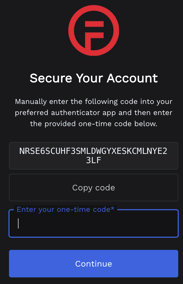
You can enter this string into Google Authenticator by clicking on the ‘+’ icon in the bottom right of the screen and selecting ‘Enter a setup key’.
To enter this string into Duo Mobile, tap on ‘+Add’, scroll to the bottom of the screen, and select "Add other account", then select ‘Use Activation code’.
I've lost access to my authenticator app
Contact support@flawless.app to reset your two-factor authentication.
Contacting Support
From within DeepEditor, click Help in the top-right corner to access the following options:
- Knowledge Base — search articles and use the AI chatbot for quick answers
- Contact support — raise a support ticket
- Share feedback — share your experience of the product
- Request feature — suggest ideas for new features
You can also email support@flawless.app directly at any time.